I recently wanted to build a weekly report in Confluence and embed a Jira burndown chart directly into the page. Confluence’s built-in macros did not include the chart I needed, so I looked into it and found that Atlassian actually supports using Jira dashboard gadgets as Confluence macros.
Since Jira dashboards can already display a burndown chart, the idea is to make that same gadget available in Confluence.
First, open the Jira home page. If you already have a dashboard, there should be an “Add gadget” button somewhere near the top right:

After clicking it, a gadget dialog will appear. Choose the gadget you want, click “View XML”, and copy the XML URL:

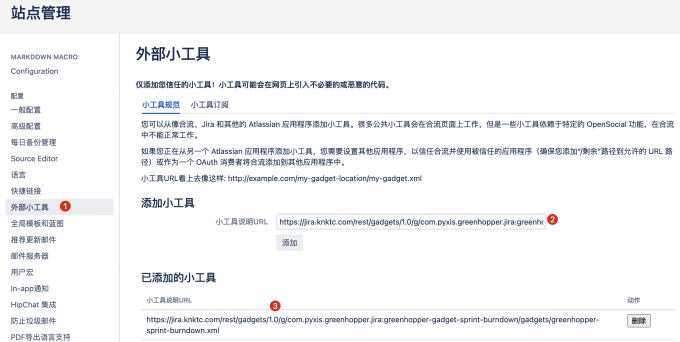
Next, log in to Confluence as an administrator and open the site administration page. Under the “External Gadgets” section, on the gadget specification tab, paste the XML URL you copied and click “Add”:
After that, when you add a macro to a Confluence page, you should see the registered gadgets in the macro picker. At that point you can insert the same gadget that exists on the Jira dashboard:

One thing to note is that these gadgets are implemented with iframes, so in practice users usually need Confluence and Jira authentication to be connected properly, typically through OAuth or a similar integration.
Reference:

